Solana Accounts: State or Executable
On Solana, every account is either state data or an executable program. That single rule shapes everything about reading and writing.
The two kinds of accounts
1) State accounts (data)
- Store bytes (data)
- Hold lamports (balance)
- Have an owner program that defines what “valid writes” mean
executable = false
2) Program accounts (code)
- Store BPF bytecode
- Are marked
executable = true - Usually not writable by normal programs
If you’re holding data, you’re a state account. If you’re running logic, you’re a program account. There isn’t a third category.
Visual mental model (from Solana docs)
These diagrams show the two account types and the exact fields the runtime exposes. Use them as a quick checklist for what you can expect when you fetch any account.
Program account (expanded view)

Key takeaway: program accounts are executable, hold bytecode, and the loader owns them. They don’t carry mutable app state.
Program account (simple view)
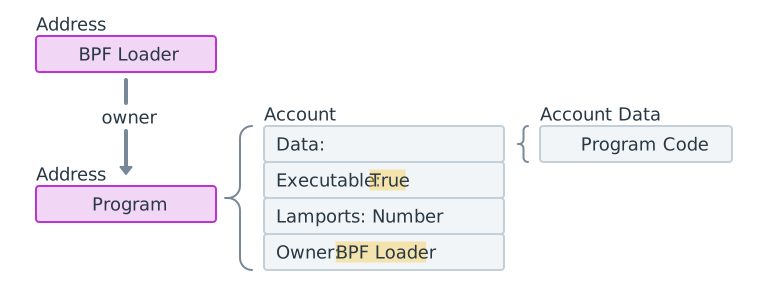
Key takeaway: the “simple” view is enough for classification — executable = true means code, not data.
Data (state) account
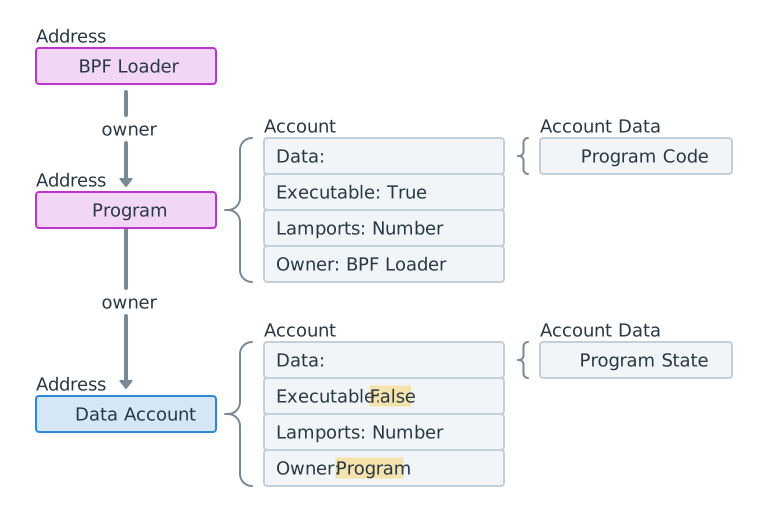
Key takeaway: data accounts are non‑executable, store bytes + lamports, and are controlled by their owner program.
Fetch a wallet account (read-only example)
A wallet is just a system-owned account. It is owned by the System Program, holds lamports, and usually has zero data.
When you fetch a wallet account, you typically inspect these fields:
lamports(balance)owner(usually the System Program)data length(often 0 for a plain wallet)executable(false)
That is enough to classify it: state account with no custom data.
Read a wallet account in TypeScript
import { Connection, PublicKey, LAMPORTS_PER_SOL } from "@solana/web3.js";

const connection = new Connection("https://api.mainnet-beta.solana.com");
const wallet = new PublicKey("YourWalletPubkeyHere");

const info = await connection.getAccountInfo(wallet);

if (!info) {
  throw new Error("Account not found");
}

console.log({
  lamports: info.lamports,
  sol: info.lamports / LAMPORTS_PER_SOL,
  owner: info.owner.toBase58(),
  dataLength: info.data.length,
  executable: info.executable,
});
This read is public. The wallet does not need to sign because you are not mutating state.
Reading on Solana
Reading is permissionless, but still explicit:
- Programs can only read accounts listed in the instruction.
- The runtime provides account data to the program at execution time.
- If an account is not in the instruction’s account list, it is invisible.
Think: reads are open, but still scoped to what the instruction declares.
Writing on Solana
Writing is strictly controlled by the runtime:
- The account must be marked writable in the instruction.
- The account’s owner program must be the program doing the write.
- Programs cannot write to accounts they do not own (unless the owner explicitly allows it via CPI).
This is the core safety rule: ownership gates writes.
Read vs write summary
- Read: any program can read an account if it is passed in.
- Write: only the owning program can mutate data/lamports, and only if marked writable.
That’s why Solana programs feel like syscalls: you pass accounts in, and the runtime enforces read/write rights.
How Ethereum does reads
Ethereum reads are also public, but the model is different:
- Accounts have code + storage instead of “account data + owner program.”
- You can read storage via
eth_callwithout a signature. - Writes require a signed transaction and consume gas.
In other words: Solana separates data accounts from program accounts, while Ethereum combines code and storage in a single contract account.
ERC‑20 / NFT equivalents (Solana vs Ethereum)
- ERC‑20 on Ethereum → SPL Token Program on Solana
- ERC‑721 / ERC‑1155 NFTs → SPL Token + metadata standard (Metaplex)
- Balances live in Ethereum contract storage, but in Solana they live in token accounts owned by the SPL Token Program.
- Minting / transfers call the token program on Solana, just like calling an ERC‑20 contract on Ethereum.
Practical mental model
- Wallet account: System Program owns it, so only System Program instructions can move its lamports directly.
- Token account: SPL Token Program owns it, so only SPL Token instructions can update balances.
- Your custom state: your program owns it, so only your program can write to it.
If you remember state vs executable and ownership gates writes, the rest of the account model clicks fast.